In a physiotherapy clinic, time is scarce: between sessions, calls, reminders, records and reception, the day fills up before treatment even starts.
Automation does not replace the physiotherapist. It means scheduling, confirmations, follow-up and documentation stop depending on WhatsApp, paper and memory.
This guide covers the real advantages of an automated clinic, what to digitize first, and how to avoid common mistakes.
The daily reality of many clinics (without automation)
If any of these sound familiar, you are not alone. They are typical frictions when operations live in scattered tools:
- Empty slots from last-minute cancellations that nobody fills in time.
- Manual reminders (or none) and patients who «forget» the appointment.
- Clinical history spread across folders, spreadsheets and loose notes.
- Reception overloaded between phone, WhatsApp and the front desk.
- Hard to see real occupancy, no-shows or which rooms/therapists are free.
As the clinic grows, administrative chaos grows faster than treatment capacity.
Advantages of automating your physiotherapy clinic
Done well, automation usually means less friction and more control. These are the benefits you notice day to day.
1. Scheduling under control (and fewer empty slots)
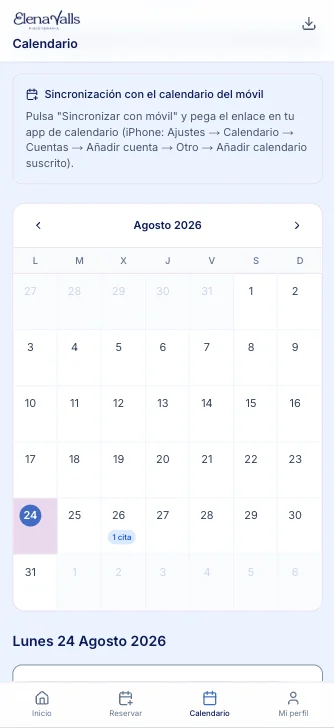
A digital agenda is not just a pretty calendar. It is the hub of operations: availability, rooms, therapists and session types in one place.
- Online or front-desk booking without double bookings.
- Automatic confirmations and reminders.
- Waitlists to fill cancellations.
- Occupancy visibility by professional or room.
Fewer no-shows and more useful appointments in the same hours. Empty time drops; clinical time rises.
2. A better patient experience
Patients do not score your software—they notice whether you care for them well, remind them, and keep treatment continuity.
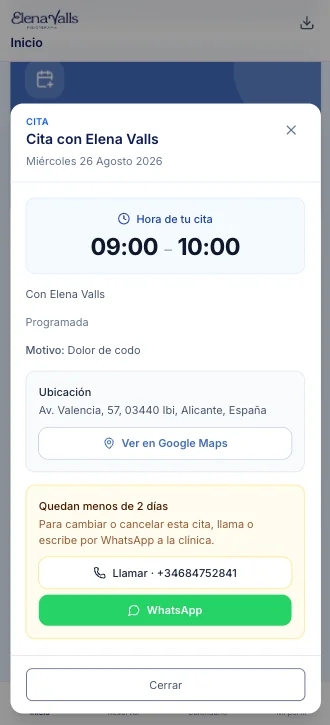
- Booking and confirmation without multiple calls.
- Clear reminders the day before or same day.
- Less waiting at reception for repeated paperwork.
- More coherent follow-up between sessions.
3. Complete, accessible clinical history
Treating without full context is slower and riskier. Automating the history centralizes what matters.
- Patient progress at every session.
- Notes, assessments and treatment goals.
- Quick access for whoever treats that day.
- Less dependence on «the person who remembers everything».
The team gains clinical continuity. Patients feel a professional follow-up, not improvisation.
4. Less mental load for the team
When reception, therapists and management share the same information, hallway questions and interruptions drop.
- Fewer cross-messages to confirm schedules.
- Repetitive tasks automated (notices, confirmations).
- Clear roles: who books, who treats, who consults.
- Easier onboarding for new staff.
5. Visibility for better decisions
Without data, the clinic runs on gut feel. With basic operational automation, useful patterns appear.
- Attendance and cancellation rates.
- Occupancy by time slot.
- Workload per professional.
- Where administrative time is lost.
You do not need a perfect dashboard on day one. You need reliable data to decide where to grow or adjust.
What to automate first in a clinic
You do not need to digitize everything at once. Start with what hurts most and repeats most:
- Scheduling and appointment management (including reminders).
- Confirmations and no-show reduction.
- History and session notes.
- New patient intake with structured minimum data.
- Basic patient communication (notices, rescheduling).
For a general prioritization approach (beyond clinics), read which processes to automate first.
Common mistakes when automating a clinic
Automating poorly also costs money. Avoid these pitfalls:
- Buying a generic tool that does not fit appointments, rooms and treatments.
- Digitizing chaos: undefined processes = messy software.
- Not training the team: if nobody uses it, there is no automation.
- Trying to do everything in month one (billing, CRM, marketing, stock…).
First scheduling, history and communication. Then the rest.
How Efiprox helps physiotherapy clinics
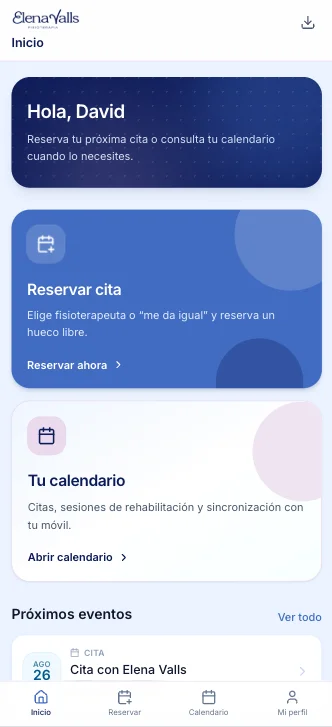
At Efiprox we build a solution designed for real physiotherapy clinic operations: bookings, patient follow-up and full history.
- Appointment and calendar management.
- Patient follow-up with history.
- Flows designed for reception and clinicians.
- A scalable base if the clinic grows or opens more centers.
To see the product in detail, visit the Physiotherapy clinics page or talk to us to assess fit.

Want less chaos and more clinical time?
Tell us how you work today (scheduling, reception, history) and we will propose a realistic approach: what to automate first and what to leave for later.
Consideration stage
Compare options and choose the next step with clarity
If you are already evaluating solutions, we can help you prioritize impact, timelines, and fit with your real processes.
Frequently asked questions
Does automating a physiotherapy clinic replace the team?
No. Automation reduces repetitive admin tasks (notices, scheduling, confirmations) so the team spends more time treating and supporting patients.
Where should a small clinic start?
With scheduling and appointment reminders. That has the biggest impact on no-shows and reception load. Then clinical history and follow-up.
Is a well-organized Excel or WhatsApp enough?
It works at the beginning, but it does not scale: you lack automatic confirmations, history traceability and occupancy visibility. With several therapists or rooms, error risk rises.
How soon do you notice improvement?
On scheduling and reminders, often within a few weeks (fewer silent cancellations, fewer calls). History and team organization consolidate in the first or second month of real use.
Do I need to train the whole team?
Yes—at least reception and anyone who books or consults histories. Without adoption, the tool does not help. A clear go-live avoids «we keep doing it the old way».
Can Efiprox adapt the solution to my clinic?
Yes. We start from real operations (appointments, professionals, history) and adapt the product to how you work, with a focus on practical impact.