
Some companies do not have a lack-of-effort problem. They have a process problem. The team works, replies, reviews, copies data, updates spreadsheets, sends emails, and fixes incidents—and every week the same wheel starts again.
If that sounds familiar, this article is for you: how to tell if your company needs to automate processes, which everyday signals to watch for, what to tackle first, and when it makes sense to ask for help. No robots sold around every corner.
What automating processes means in a company
Automating processes in a company is not about building a technology lab. It means using tools—sometimes very simple ones—so certain tasks run in an orderly, repeatable way with less manual intervention.
Examples you see in any office:
- send reminders when a deadline is due;
- log web form submissions in the CRM;
- generate a report without copying data by hand from three different spreadsheets;
- notify the owner when an incident has been open too long;
- classify requests or tickets using clear rules;
- connect tools that today do not talk to each other.
Automating does not mean putting robots everywhere. It often starts with something as simple as stopping one person from copying the same information into three different places.
Business process automation is not about doing more things. It is about stopping the same work from repeating—and giving the team time for what actually adds value: serving better, deciding better, selling better.
Signs your company needs to automate processes
Nobody has to say the word “automation” out loud. If several of these points sound familiar, you likely have real room to improve how the company works—with something more than brute force.

1. The team repeats the same tasks every day
Problem: Copying data from one place to another, sending nearly identical emails, checking statuses one by one, updating spreadsheets, generating the same document with different names.
Consequence: Hours go to mechanical work. The “here we go again” feeling. And when someone is out, that work piles up or gets done wrong.
What could be automated: Flows with fixed rules: if the data comes in the same way and the steps look alike, it is a strong candidate for automating repetitive tasks.
2. Information lives across spreadsheets, email, and WhatsApp
Problem: Nobody knows which version is current. Messages get lost. Data sits on one person’s phone and nowhere shared.
Consequence: Decisions based on incomplete information. Customers get different answers depending on who they ask—and too much depends on whoever “keeps it in their head.”
What could be automated: Centralize data, connect tools, and build dashboards or flows where information arrives on its own, without someone acting as a permanent messenger.
If a spreadsheet has become the heart of the company, it is worth a review. Not because spreadsheets are bad—because when everything goes through the same person, you have a process problem.
3. Manual errors are frequent
Problem: Data copied wrong, duplicate orders, invoices with mistakes, incidents that never get logged.
Consequence: Rework, internal friction, unhappy customers. Hours fixing what should not have broken in the first place.
What could be automated: Validations, automatic logging, alerts when required data is missing. The issue is usually not that the team works badly—it is that the process forces too much manual work.
4. Everything depends on one or two key people
Problem: If someone is away, the process stops. Knowledge lives in conversations, not in an accessible place. There is no clear traceability.
Consequence: Bottlenecks, stress for whoever “knows everything,” and risk if that person changes role or leaves.
What could be automated: Flows with roles, visible statuses, automatic alerts, and documentation that does not rely on memory. Well-designed business automation spreads the work without removing accountability from people.
The goal is rarely to clone that person—it is to make the workflow visible so others can step in without breaking everything.
5. Opportunities are lost because follow-up fails
Problem: Leads nobody answers in time, quotes sent with no follow-up, customers asking the same question again, incidents left open with no owner.
Consequence: Deals that do not close, reputation damage, a sense of disorder.
One company told us they were losing quotes not because the price was wrong, but because quotes “slipped away” between emails.
What could be automated: Reminders, CRM tasks, priority alerts, customer confirmations. Nothing fancy—just making sure nothing is left hanging.
6. Reports take too much time
Problem: Every week someone collects data by hand. Numbers arrive late. Meetings decide using information that is ten days old.
Consequence: Slow or wrong decisions. A finance lead who spends hours every Friday on a report that could generate itself if the data were connected.
What could be automated: Dashboards, scheduled reports, database connections, and indicators in near real time.
7. Growing means hiring more people to do the same thing
Problem: Every new customer, order, or project multiplies the same manual work in proportion.
Consequence: Margins that do not scale, overloaded teams, and the feeling that “we cannot keep going without more people.”
What could be automated: Steps that repeat the same way at volume 10 or volume 100: onboarding, assignments, alerts, logging, basic reports.
If every new customer means the same manual dance as before, the process is not ready to grow. That is not lack of ambition—it is lack of operational design.
Processes companies usually automate first
There is no single list for every company, but in practice you start where it hurts most and the rules are clearest. Common areas:
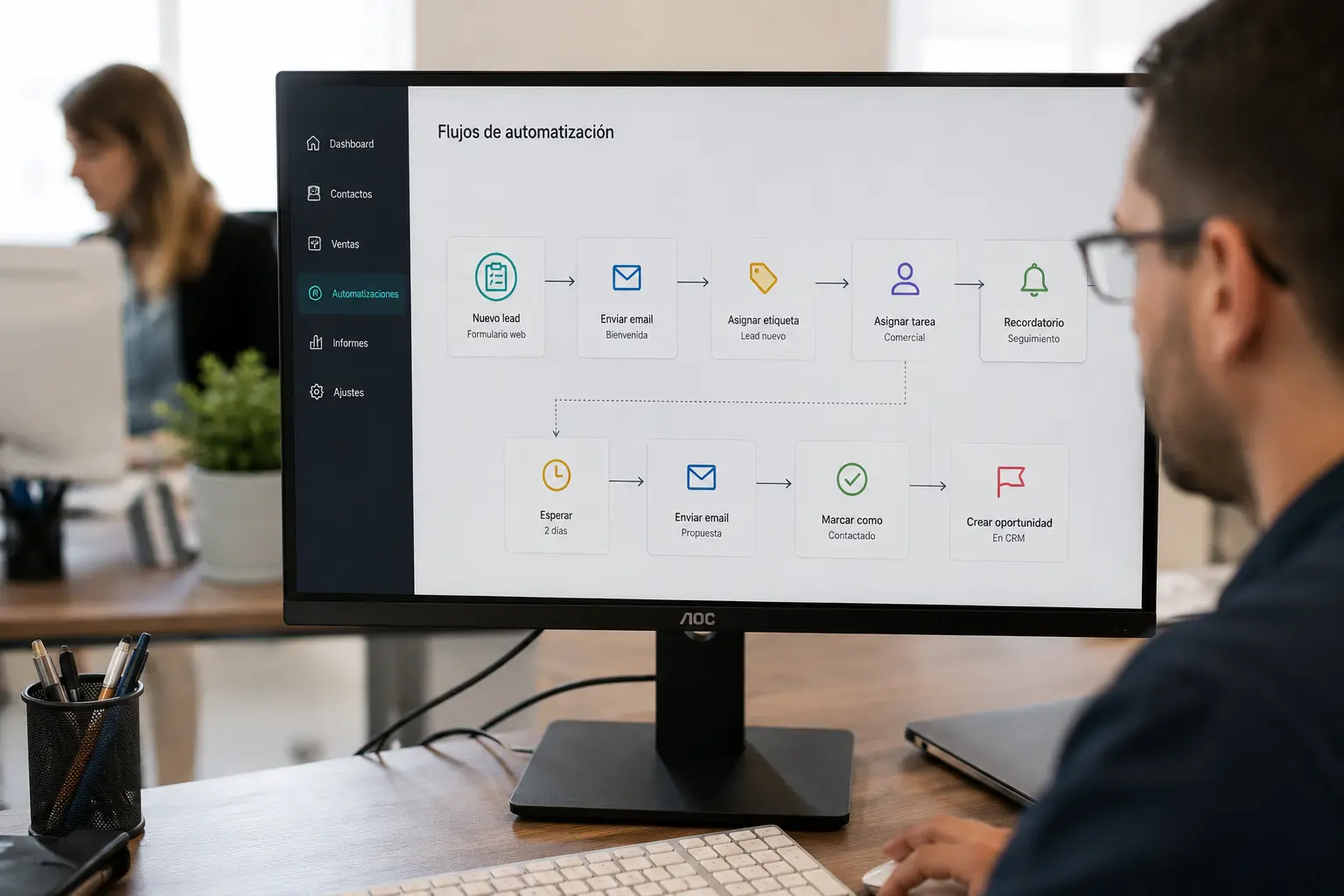
- customer service and answers to frequent questions;
- lead capture and follow-up;
- invoicing and administration;
- report generation;
- incident management;
- maintenance and review reminders;
- inventory and stock alerts;
- bookings and appointments;
- customer onboarding;
- recurring internal tasks (approvals, onboarding, reminders).
That is a good place to talk about how to automate processes without jumping to the hardest problem: pick one bounded flow, measure the savings, then scale. Good software to automate processes—or a tailored solution—should fit how you work, not the other way around.
When you should NOT automate yet
Saying this builds trust because not everything should be automated right now. Typical cases:
- the process is still unclear and not written down;
- it changes every week with no pattern;
- nobody really knows what steps it has;
- there is not enough data to work with;
- what you need is to simplify, not speed up the mess.
Before you automate a bad process, understand it and simplify it. Automating chaos only makes chaos run faster.
If you are still unsure when to automate processes, the signal is not “we have lots of technology”—it is “we have a repeatable flow that hurts and we can describe on paper.”
Real benefits of automating processes
Let us skip the generic PowerPoint list. This is what you notice on the ground:
Time saved
Less copy-paste, fewer “can you send me the updated file?” moments. More room to serve customers, negotiate, or improve the product.
Fewer errors
Data is entered once. Rules apply the same way every time. It does not remove human judgment—it removes the silly mistake that costs real money.
Better follow-up
You know what is pending, who owns it, and since when. Quotes do not disappear in email thread 47.
More control
Centralized information and traceability. When someone asks “what happened with this?” there is an answer without reconstructing the whole story.
Scalability
You can grow without multiplying the same manual work. Operations handle more volume with the same team—or with more reasonable hiring.
A practical automation example in a company
A company receives requests via web form, email, and phone. Before, someone copied everything into a spreadsheet, emailed the owner, updated statuses by hand, and on Friday built a report for management.
With well-designed business process automation:
- each request lands in one central system;
- it is assigned by type or priority;
- the owner gets a notification;
- the customer gets a confirmation;
- the status is recorded;
- reports generate themselves.
The improvement is not “having a new tool.” It is that work stops depending on memory, loose emails, and repetitive tasks nobody wants but everyone ends up doing.
How to start automating processes step by step
1. Spot repetitive tasks
Ask the team: what do you do every day or every week that is always the same? Write it down without filtering. That is your initial map.
2. Measure wasted time
Hours, errors, delays. Without numbers it is hard to prioritize. You do not need a six-month study—one honest week of tracking is often enough.
3. Define the ideal process
Not only how you work today, but how it should work if you started from scratch with fewer steps and fewer loose tools.
4. Prioritize by impact
Start with what hurts most, not what is most complex. A visible first win motivates the team and justifies the next step.
5. Choose a scalable solution
That might be integrations between tools you already use, a flow with clear rules, custom development, or in some cases a layer of artificial intelligence. What matters is that it holds up when volume grows.
Automation, custom software, and AI: how they fit together
Three pieces that often get mixed up in the same conversation:
- Automation runs rules: “if this happens, do that.”
- Custom software adapts the system to how your company works—not the other way around.
- Artificial intelligence helps when there is a lot of text, classification, prediction, or volume that fixed rules cannot cover.
A flow can automate sending alerts. If you also need to classify emails, summarize conversations, or spot priorities in free-form messages, AI can add an extra layer—with supervision and tidy data.
If you want to go deeper: process automation, custom software and artificial intelligence for business.
Does your company need to automate processes?
Go through this calmly. You do not need to tick everything for it to be worth a look:
- Does your team repeat manual tasks every week?
- Do you rely on too many spreadsheets for critical work?
- Do you lose data or follow-ups?
- Are there errors from copying information?
- Do reports take too long?
- Does growth mean more of the same operational load?
- Do you depend too much on specific people?
If you answered yes to several, there is a real opportunity to automate processes in the company with measurable return. The next step does not have to be a huge project—an honest review of two or three flows is often enough to see which processes to automate first.
How Efiprox can help
At Efiprox we help companies analyze their processes and turn repetitive tasks into more efficient, connected, scalable systems. We work with custom software, automation, integration with tools you already use, and AI when it adds real value—not for hype.
If you recognize yourselves in several signals from this article, we can review your case and spot which processes have the most automation potential—with a practical, no-nonsense approach.
Keep reading (helpful links)
This article works as a hub on automation—combine it with AI, custom software, and integration guides depending on your next question.
Recommended links: how to digitize a company step by step, which processes to automate first, how to implement artificial intelligence in a company, Process automation service, What artificial intelligence is and how it works, How much custom software development costs, when custom software development makes sense, What software is and its types, Systems integration, Industrial maintenance software, Custom website vs WordPress: which to choose.
Consideration stage
Compare options and choose the next step with clarity
If you are already evaluating solutions, we can help you prioritize impact, timelines, and fit with your real processes.
Frequently asked questions
What does it mean to automate processes in a company?
It means using technology so repetitive tasks with clear rules run in an orderly way, with fewer manual copies and better traceability. It does not replace the team—it removes mechanical load.
Which processes can be automated?
Those that repeat, follow similar steps, and handle structured data: sales follow-up, incidents, reports, onboarding, alerts, billing admin, bookings, and recurring internal tasks.
How much does it cost to automate processes?
It depends on scope: a simple integration is not the same as a custom system. Most teams start with one bounded flow and measure time saved and errors avoided before scaling.
Does automation replace workers?
In most SMEs it does not remove roles—it cuts repetitive tasks so people focus on customers, decisions, and relationships. The goal is to scale without multiplying the same manual work.
What is the difference between automation and artificial intelligence?
Automation applies fixed rules (“if X happens, do Y”). AI helps with free text, complex classification, or large volumes where interpretation or prediction is needed—with supervision.
How do you know which process to automate first?
List repetitive tasks, measure time and errors, pick the flow that hurts most and can be described clearly. Avoid starting with the hardest problem—a visible first win makes the next step easier.