
In recent years, so much has been said about artificial intelligence that many companies have reached a slightly dangerous conclusion: they believe any technology improvement must involve AI.
And it is not surprising. They open LinkedIn, watch a webinar, listen to a vendor… and in the end it all sounds the same: “you need to adopt artificial intelligence.”
However, in many projects the opposite happens. Before applying AI, you can achieve a huge impact simply by automating processes that are still manual today: invoices copied by hand, orders living in someone’s WhatsApp, reports built every Friday by pasting data from three different Excels.
So… what is the difference? When does it make sense to automate, and when is it worth incorporating artificial intelligence?
In this article we will look at it with real examples, without jargon, and with a more useful question than “what is each thing”: what does your company really need right now?
Why are AI and automation so often confused?
Because both save time. Both improve processes. Both remove repetitive work. From the outside they look the same. From the inside, they are not.
Automation executes. Artificial intelligence interprets. One follows rules. The other works with patterns, context, and uncertainty.
All AI can be part of automation, but not all automation uses artificial intelligence.
That matters more than it seems. If you buy “AI” when what you need is a clear flow, you end up paying for complexity without solving the underlying problem. And if you only automate when the bottleneck is interpreting information, the process stays stuck… just more neatly organized.

What is process automation
Automating, put simply, is this: when A happens, do B. Without someone having to remember, copy, notify, or chase the next step.
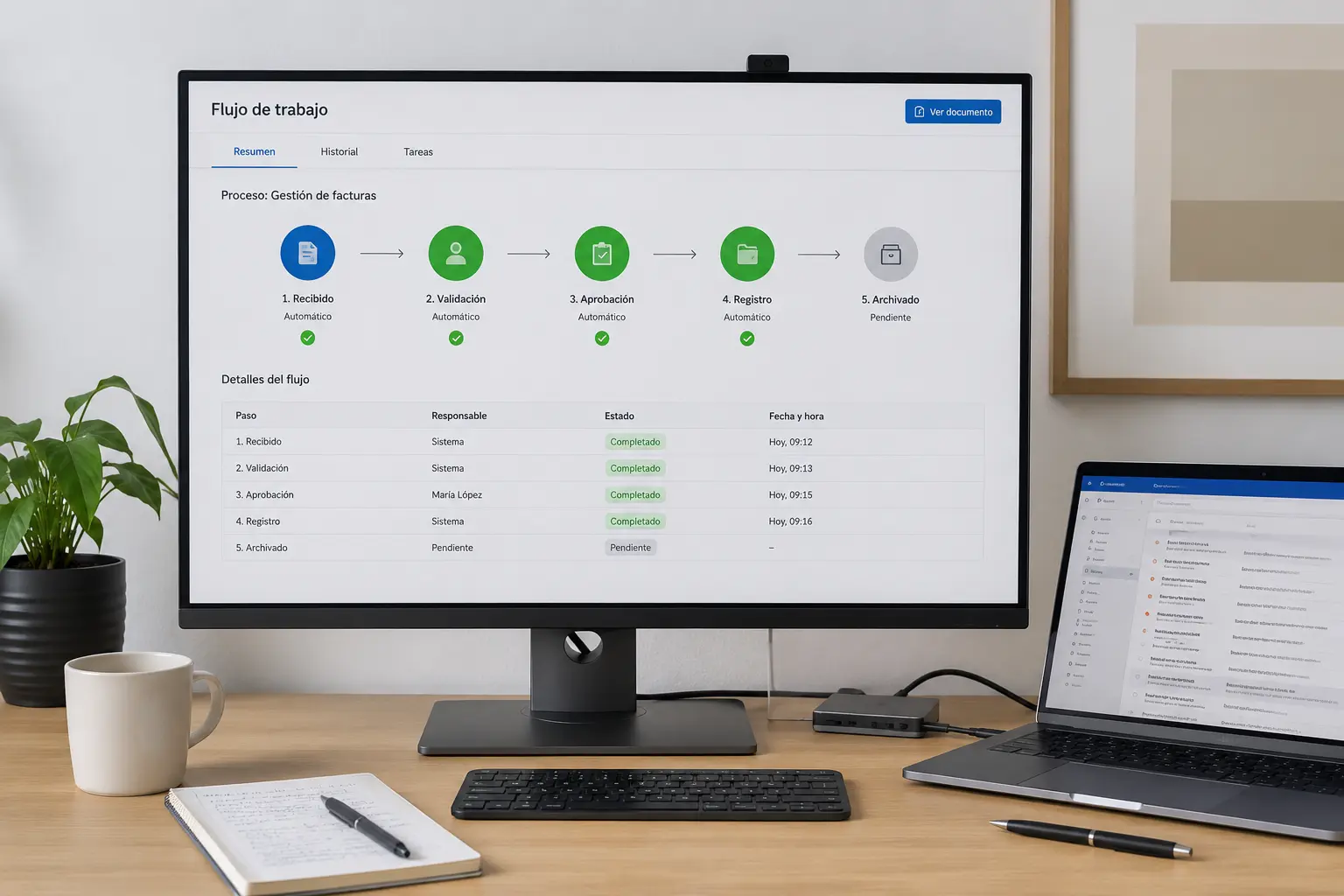
Classic example:
- An invoice arrives
- It is stored
- The owner is notified
- It is approved (or not)
- It is recorded
All automatically. With rules. With statuses. With traceability. The system does not need to “understand” the invoice in a deep sense. What matters is that the flow does not depend on three people’s memory and an endless email thread.
Automation shines when the process can be described. When you know what goes in, what comes out, and what should happen in each case.
If you want the details on signs and first steps, we cover them here: how to know if your company needs to automate processes.
What is artificial intelligence applied to a company
AI, on the other hand, is not limited to executing a fixed rule. It makes decisions —or helps make them— based on information.
It can classify, predict, summarize, recommend, or generate content.
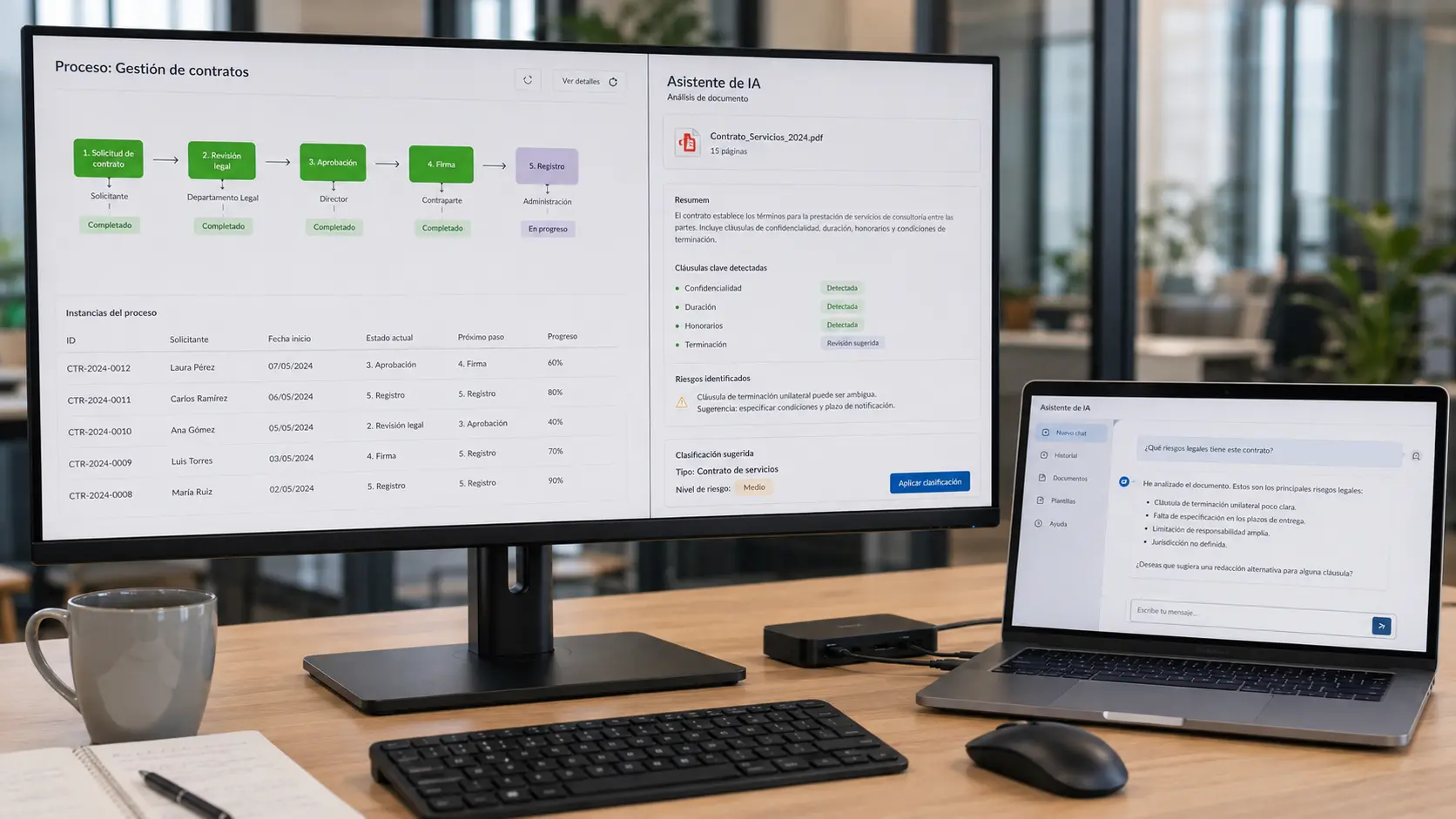
For example: not just “if an email arrives, notify John.” But “this email looks like an urgent incident from a VIP client; prioritize it and prepare a history summary.”
There are no longer just rules. There is interpretation. You do not need to become a model expert. You do need to understand that AI adds value when there is data, context, and a problem that cannot be solved with a simple “if… then…”
If you want the basics without hype: what is artificial intelligence and how it works.

AI vs automation: the most important differences
| Automation | Artificial Intelligence |
|---|---|
| Follows defined rules | Learns from data and patterns |
| Always acts the same way | Can adapt the response |
| Very useful for repetitive tasks | Very useful for tasks requiring interpretation |
| Simpler to deploy (in many cases) | Requires data and training depending on the case |
| Lower complexity | Higher complexity |
| High return on repetitive processes | High return when information is complex |
1. Fixed rules vs interpretation
If whenever an order exceeds X euros it must be approved by management, that is automation. Clear. Predictable. Measurable. If you need to decide whether a contract has conflicting clauses or whether an email is a complaint, inquiry, or sale… that is where AI starts to make sense.
2. Always the same vs adaptable response
Automation does not improvise. And that is often an advantage. AI can vary depending on content. Useful when cases are not identical. Awkward when you need 100% predictable, auditable behavior without nuance.
3. Repetitive tasks vs tasks requiring judgment
Copying data, sending reminders, generating a PDF, moving a status: automation. Classifying messy documents, detecting odd patterns, summarizing meetings, prioritizing incidents: AI.
4. Complexity and deployment
Automating a well-defined flow is usually faster to launch. AI requires more: reasonably clean data, test cases, supervision, and often integration with other systems.
5. Where return usually sits
If your team loses hours on mechanical steps, automation usually pays back sooner. If the bottleneck is understanding information —documents, messages, history, signals— AI can make the difference.
Cases where automation is enough
This section debunks an annoying myth: you do not need AI for everything.
- Automatic email sending
- Document approval
- Reminders and deadlines
- Order management with clear rules
- Recurring invoicing
- Basic document management (store, version, notify)
- Threshold or status alerts
- Backups and scheduled tasks
If the process can be written on a whiteboard with arrows and almost no “it depends…”, start there. Many companies discover the problem was not “lack of artificial intelligence.” It was lack of flow.
That connects directly to the hidden costs of manual processes in a company.
Cases where AI makes the difference
There are moments when automating with rules is not enough. Because input is not clean. Because there are too many variants. Because interpretation is required.
- Classifying emails or tickets by intent and priority
- Detecting incidents or anomalies
- Analyzing contracts and long documents
- Summarizing meetings and leaving clear actions
- Supporting customer service with context
- Analyzing images (quality, visual documentation, etc.)
- Demand forecasting
- Predictive maintenance
AI does not “replace the process.” It helps where humans drown in interpretation. After that, automation is almost always needed to execute what is decided.
If you already understand the difference and want to deploy with criteria, the natural next step is how to implement artificial intelligence in a company.
What usually offers more return to a company?
It depends. (Yes, it is the least sexy answer. It is also the most honest.)
But in many companies the pattern repeats:
- Processes are automated first.
- Then AI is added where it adds value.
Why? Because AI needs organized processes. Data that exists. Clear owners. A measurable before and after.
Automating a well-defined process usually delivers results sooner than trying to apply artificial intelligence on top of a messy process.
This is not anti-AI. It is pro-results. And it fits a broader view of how to digitize a company step by step: technology is the means; the goal is for the company to work better.
How to know what your company needs
Forget the labels for a moment. Look at your day to day.
If this sounds familiar → automation
- Tasks repeat almost the same way every time
- You know exactly what should happen at each step
- The problem is time, forgetfulness, copy-paste, or lack of follow-up
- “If A happens, B should happen” can be written without much debate
If this sounds familiar → artificial intelligence
- Texts, documents, images, or history must be interpreted
- Cases change and fixed rules fall short
- The team loses hours classifying, summarizing, or finding patterns
- You want to prioritize, predict, or recommend with richer criteria
If this sounds familiar → both
- You first need to organize the flow… and there is also an interpretation part
- Example: AI classifies the email; automation creates the incident, notifies, assigns, and follows up
- You want less manual work and better decisions on complex information
If after reading this you are not sure which column you are in, that is fine. That doubt is already information. It means you should look at processes before buying tools.
How AI and automation work together
They do not compete. They complement each other.
An example anyone in an office understands:
- An email arrives
- AI classifies it (incident, inquiry, sale?)
- Automation creates the incident
- Notifies the owner
- Assigns according to rules
- Follows up if it stays open
AI decides or suggests. Automation executes. That is, in practice, what many people call “intelligent automation.” It is not magic. It is a well-designed process where each layer does what it does best.
The role of custom software
This is where many companies get stuck. They have an ERP. A CRM. Some spreadsheets. Email tools. Maybe a chatbot. And everything lives on islands.
For automation and AI to really work, you often need to connect existing systems, business rules, data, and the team’s real exceptions.
And that, in many cases, is not solved with a generic connector and a slide deck. It requires a solution that fits how you actually work.
When the question is “do we solve this with standard tools or do we need something custom?”, this article helps: custom software: when it makes sense to build a tailored solution.
How Efiprox can help
We are not here to tell you that you need AI. We are here to help you decide whether you need it… or whether you should automate first.
Our process, in short:
- We analyze how you work
- We detect where time is lost and errors are generated
- We design the flow
- We automate what can already run with rules
- We add AI only when it delivers real value
- We measure whether it actually improves day-to-day work
Not every company needs artificial intelligence. Many get better results by starting with automation.
And when AI does make sense, it arrives at the right moment: with ready processes, useful data, and a team that understands what it is for.

Keep exploring the cluster
This article is a bridge between digitization, automation, and artificial intelligence. To go deeper:
how to implement artificial intelligence in a company, what is artificial intelligence and how it works, how to digitize a company step by step, how to know if your company needs to automate processes, custom software: when it makes sense, the hidden costs of manual processes, how to choose a software development company, which processes to automate first.
Consideration stage
Compare options and choose the next step with clarity
If you are already evaluating solutions, we can help you prioritize impact, timelines, and fit with your real processes.
Frequently asked questions
What is the difference between AI and automation?
Automation executes defined rules: when A happens, it does B. Artificial intelligence interprets information: it classifies, summarizes, predicts, or recommends. They can work together, but they are not the same.
Which is better for a company?
It depends on the problem. If the pain is repetitive, predictable work, automation usually wins. If the pain is interpreting complex information, AI adds more. In many cases, the best sequence is to automate first and add AI later.
Does all automation use AI?
No. In fact, most useful business automations do not need artificial intelligence. Just rules, integrations, and a clear process.
Can they be combined?
Yes, and that is often the most powerful approach. AI interprets; automation executes. For example: classify an email with AI and open, assign, and follow the incident automatically.
Which costs less to deploy?
In general, automating a well-defined process is usually faster and cheaper than an AI project. AI adds complexity: data, integration, and supervision. Real cost depends on scope and the company’s starting point.
Do I need custom software?
Not always. Sometimes connecting tools you already have is enough. Custom software makes sense when you need to integrate ERP, CRM, automation, and AI coherently with your real processes —and generic solutions fall short.